
Inventory & POS: Sales Tracker2.4 - App Store
You'll be able to see results in few seconds.
Publisher Description

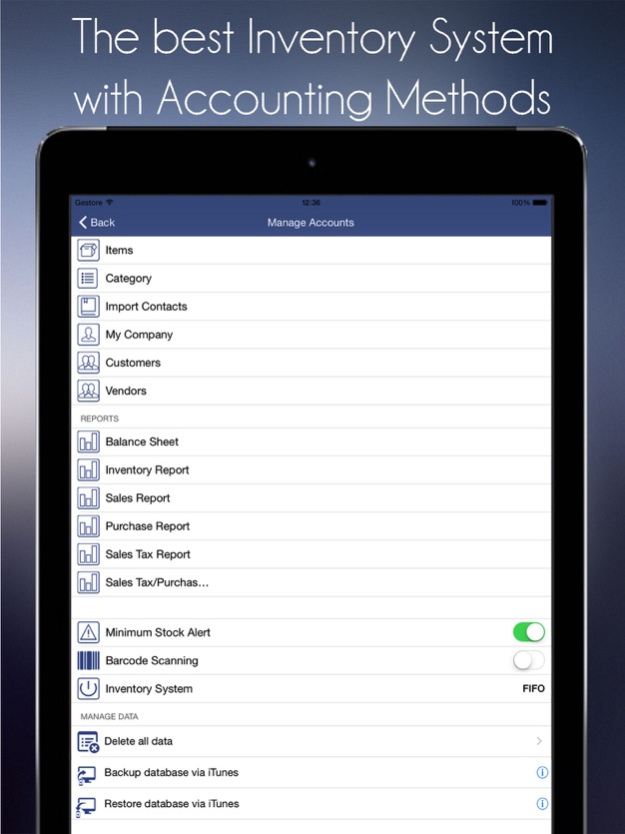
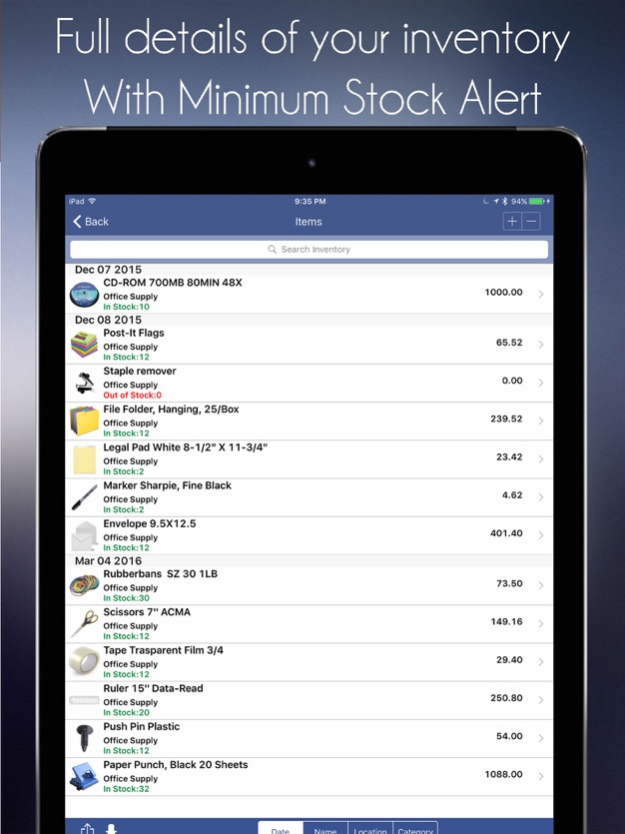
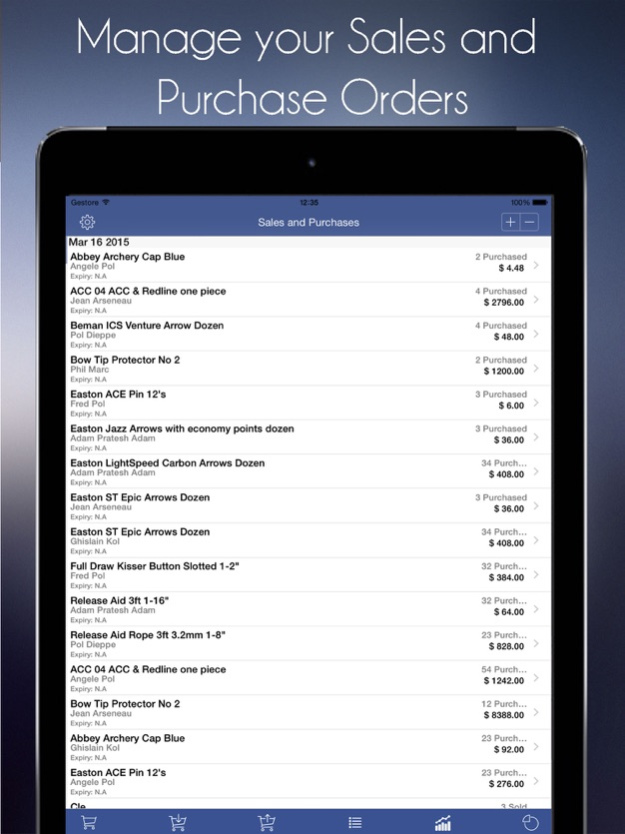
Scan it, stock it, sell it. Inventory and point of sale for small shops, market sellers and resellers, in one simple app.
Add a product with one barcode scan, ring up a sale in seconds and always know what is on your shelf. Take cards with just your iPhone, keep your Shopify store in step, and export your data at any time. No hardware to buy, no fee per device.
WHY SHOP OWNERS PICK IT
- Barcode and QR scanning with your iPhone or iPad camera
- Tap to Pay on iPhone: accept contactless cards and Apple Pay with no card reader
- Two-way stock sync with your Shopify store
- Receipts in English or French, with GST/QST lines and your registration numbers
- Low-stock alerts before you run out
- Works offline; with Pro, syncs across your iPhone and iPad
- AI assistant: say "add 12 blue mugs at 8 dollars" and it is done
- One flat price, not per device or per location
INVENTORY
- Snap a photo of a product and the app fills in the item
- Stock history for every item: sold, received, adjusted
- Suppliers, reorder points and multiple locations
- Print barcode labels on standard Avery sheets
- Import from CSV or Excel, export to CSV any time
POINT OF SALE
- Product grid and cart built for speed
- Tap to Pay on iPhone through your own Stripe account, including Interac in Canada
- Card payments through your Square account
- Sales tax set by region, including Canadian GST, HST and Quebec TPS/TVQ on separate lines
- End-of-day report, transaction history and refunds
- Staff PIN, with manager approval for refunds
SHOPIFY SYNC
Connect your Shopify store and match products by SKU or barcode. A sale at your counter updates Shopify, and an online order updates your shelf count.
REPORTS
- Today's sales, best sellers and slow movers
- Profit by item, based on your cost
- Stock value at a glance
- Accounting export for QuickBooks and Xero
PRIVATE BY DESIGN
Face ID lock, Sign in with Apple, and your data is never sold.
MADE FOR
Boutiques, gift shops, salons, craft fairs and pop-ups, flea market and online resellers, small warehouses and home businesses.
Tap to Pay on iPhone requires a compatible iPhone and a Stripe account. Shopify sync requires a Shopify store.
Terms of Use: https://www.apple.com/legal/internet-services/itunes/dev/stdeula/
Privacy Policy: https://icube.so/privacy
Questions? support@icube.so. We read every message.
Version History Big update for small shops:
- New Tap to Pay feature
- New Shopify Sync feature
- Receipts now show your GST and QST numbers, in English or French
- Cleaner dashboard and faster checkout
- Many fixes across inventory, sync and reports 2.4 17h ago • Sales save reliably and stock updates once per sale, never twice
• Tap any sale in history to see its full detail; filter by any date range
• Revenue is recognised on the date you were paid, so past months stay put
• Customer balances and outstanding totals now come from your real invoices
• Categories and suppliers save properly and stay put between launches
• Out-of-stock items are counted separately from low stock
• Amounts use your own currency and show exact figures
• Redesigned home, inventory, reports and settings
• Fixed a crash when syncing or refreshing 2.301 Aug 31 STABILITY & CRASH FIXES
• Fixed app crash on Inventory page load (CoreData entity name mismatch)
• Fixed POS dashboard showing $0.00 after completing transactions — now updates in real-time
• Fixed shopping cart being cleared when navigating back from checkout
• Fixed "Complete Sale" button not triggering payment collection
NEW FEATURES
• Barcode scanner with camera integration — supports 12+ formats (EAN-8/13, UPC-E, Code 128/39/93,
QR, PDF417, Aztec, ITF-14, Data Matrix)
• Full category management: create, edit, and delete product categories with dynamic pickers
• Full supplier management: 18+ fields including contact persons, payment terms, ratings, and tax IDs
• Professional receipt PDF generation and sharing via email, messaging, or AirDrop
• Smart app rating prompt with optimal timing after key milestones
IMPROVEMENTS
• Customer details now displayed in POS transaction history (name, company, email, phone)
• Stock adjustments track the authenticated user instead of generic "iOS User"
• Category names display correctly in Inventory Item Detail (no more placeholder text)
• Proper error alerts for refund operations with user-friendly messages
LOCALIZATION
• Full support for 11 languages: English, Spanish, French, German, Dutch, Russian, Danish, Japanese,
Chinese (Simplified & Traditional), Spanish (US)
• 4,000+ localization keys with type-safe translation system
TECHNICAL
• Swift 6 concurrency safety (async/await, @MainActor)
• Improved CoreData thread handling for reliable data persistence
• Offline-first architecture with background cloud sync 2.3 Mar 19 Bug Fixes
- Critical Fix: Resolved an issue that prevented new users from receiving
verification emails, which blocked access to the app. All new users can now sign up
and verify their accounts successfully.
New Features
- Multi-Language Support: Added localization for 10 languages including French,
Spanish, German, Chinese (Simplified & Traditional), Japanese, Russian, Dutch, and
Danish
- Data Import: Import your inventory, contacts, and sales data from CSV, Excel, and
JSON files with flexible column mapping 2.1.2 12/04/2025 What's New in Version 2.2.0
IMPROVEMENTS
• Enhanced Account Setup - Email verification now seamlessly opens in the app for a smoother onboarding experience
• Improved Sign-In Flow - New users can now access their accounts immediately after email confirmation
• Refreshed Design - Updated authentication screens with a vibrant golden theme that matches our
app icon
BUG FIXES
• Fixed email confirmation redirect issues
• Improved session management for new accounts
• Enhanced security with better token handling
Thank you for using Inventory Tracker! We're constantly working to improve your business management
experience. 2.1.1 10/24/2025 WHAT'S NEW
AI Assistant
• Manage inventory with voice commands or text
• "Add 50 Blue T-Shirts" – it's that simple
• Get smart predictions and instant insights
• Hands-free inventory updates while you work
Advanced Inventory System
• Unlimited inventory items (Pro)
• Smart low-stock alerts
• Product categories and organization
• Barcode scanning with camera
• Bulk import/export via CSV/Excel
Full POS System
• Complete point-of-sale with payment processing
• Accept cash and card payments
• Automatic inventory updates on every sale
• Professional PDF receipt generation
• Email or print receipts instantly
Customer Management
• Track customer purchase history
• Build customer profiles
• View customer analytics
• Improve customer relationships
Refund Processing
• Complete refund management system
• Transaction history tracking
• Seamless return handling
Advanced Analytics
• Real-time sales trends
• Revenue insights and reporting
• Inventory performance metrics
• Daily, weekly, and monthly breakdowns
Cloud Sync & Backup
• Automatic cloud backup
• Access data across all devices
• Secure encrypted storage
• Never lose your inventory data
Modern Design
• Beautiful, intuitive interface
• Smooth animations and transitions
• Dark mode support
• Optimized for iPhone and iPad
Enhanced Security
• Encrypted data storage
• Secure authentication
• Privacy-first approach
• Your data stays yours
Performance Improvement 2.1 10/23/2025 Bugs & metadata fixes 2.0.2 07/14/2025 Bug fixes 2.0.1 06/23/2025 • View and manage sales and stock from any web browser
• Print receipts instantly with Bluetooth printers
• Track staff shifts, attendance, and simple payroll in one place
• Offer pay‑later and track balances with a customer credit ledger
• See profit, loss, and expenses on clear dashboards
• Get real‑time sync and push alerts for new sales and low stock 2.0 06/12/2025 Adding iTunes File sharing feature. 1.2.6 06/15/2017 Compatibility with iOS 10.0.2 1.2.5 11/03/2016 Fixing backup and restore. 1.2.4 08/16/2016 Performance improvements. 1.2.3 08/10/2016 New Features
1. Adding payment button on Edit Transaction screen for Sales and Purchase.
2. Now you can receive Paypal payment with Paypal link in email.
3. Adding Paypal Id on Vendor screen.
4. Adding Payment method button on setting screen.
5. Fixing other bugs. 1.2.2 07/09/2016 Adding item photos as thumbnails.
Sync images with other devices.
Fixing bug with sync. 1.2.1 03/11/2016 * Allowing user to add more than one item on Sales and Purchase screen.
* Allowing user to email invoices or sale receipts of transactions.
* Other improvements. 1.2 11/25/2015 Fixing crashing and issues under iOS 9. 1.1 10/08/2015 1.0 06/04/2015
About Inventory & POS: Sales Tracker
The company that develops Inventory & POS: Sales Tracker is iCubemedia Inc.. The latest version released by its developer is 2.4.
To install Inventory & POS: Sales Tracker on your iOS device, just click the green Continue To App button above to start the installation process. The app is listed on our website since 2026-10-14 and was downloaded 0 times. We have already checked if the download link is safe, however for your own protection we recommend that you scan the downloaded app with your antivirus. Your antivirus may detect the Inventory & POS: Sales Tracker as malware if the download link is broken.
How to install Inventory & POS: Sales Tracker on your iOS device:
- Click on the Continue To App button on our website. This will redirect you to the App Store.
- Once the Inventory & POS: Sales Tracker is shown in the iTunes listing of your iOS device, you can start its download and installation. Tap on the GET button to the right of the app to start downloading it.
- If you are not logged-in the iOS appstore app, you'll be prompted for your your Apple ID and/or password.
- After Inventory & POS: Sales Tracker is downloaded, you'll see an INSTALL button to the right. Tap on it to start the actual installation of the iOS app.
- Once installation is finished you can tap on the OPEN button to start it. Its icon will also be added to your device home screen.
Program Details
System requirements
Download information
Pricing
Version History
version 2.4
posted on 2026-10-14
Version History Big update for small shops:
- New Tap to Pay feature
- New Shopify Sync feature
- Receipts now show your GST and QST numbers, in English or French
- Cleaner dashboard and faster checkout
- Many fixes across inventory, sync and reports 2.4 17h ago • Sales save reliably and stock updates once per sale, never twice
• Tap any sale in history to see its full detail; filter by any date range
• Revenue is recognised on the date you were paid, so past months stay put
• Customer balances and outstanding totals now come from your real invoices
• Categories and suppliers save properly and stay put between launches
• Out-of-stock items are counted separately from low stock
• Amounts use your own currency and show exact figures
• Redesigned home, inventory, reports and settings
• Fixed a crash when syncing or refreshing 2.301 Aug 31 STABILITY & CRASH FIXES
• Fixed app crash on Inventory page load (CoreData entity name mismatch)
• Fixed POS dashboard showing $0.00 after completing transactions — now updates in real-time
• Fixed shopping cart being cleared when navigating back from checkout
• Fixed "Complete Sale" button not triggering payment collection
NEW FEATURES
• Barcode scanner with camera integration — supports 12+ formats (EAN-8/13, UPC-E, Code 128/39/93,
QR, PDF417, Aztec, ITF-14, Data Matrix)
• Full category management: create, edit, and delete product categories with dynamic pickers
• Full supplier management: 18+ fields including contact persons, payment terms, ratings, and tax IDs
• Professional receipt PDF generation and sharing via email, messaging, or AirDrop
• Smart app rating prompt with optimal timing after key milestones
IMPROVEMENTS
• Customer details now displayed in POS transaction history (name, company, email, phone)
• Stock adjustments track the authenticated user instead of generic "iOS User"
• Category names display correctly in Inventory Item Detail (no more placeholder text)
• Proper error alerts for refund operations with user-friendly messages
LOCALIZATION
• Full support for 11 languages: English, Spanish, French, German, Dutch, Russian, Danish, Japanese,
Chinese (Simplified & Traditional), Spanish (US)
• 4,000+ localization keys with type-safe translation system
TECHNICAL
• Swift 6 concurrency safety (async/await, @MainActor)
• Improved CoreData thread handling for reliable data persistence
• Offline-first architecture with background cloud sync 2.3 Mar 19 Bug Fixes
- Critical Fix: Resolved an issue that prevented new users from receiving
verification emails, which blocked access to the app. All new users can now sign up
and verify their accounts successfully.
New Features
- Multi-Language Support: Added localization for 10 languages including French,
Spanish, German, Chinese (Simplified & Traditional), Japanese, Russian, Dutch, and
Danish
- Data Import: Import your inventory, contacts, and sales data from CSV, Excel, and
JSON files with flexible column mapping 2.1.2 12/04/2025 What's New in Version 2.2.0
IMPROVEMENTS
• Enhanced Account Setup - Email verification now seamlessly opens in the app for a smoother onboarding experience
• Improved Sign-In Flow - New users can now access their accounts immediately after email confirmation
• Refreshed Design - Updated authentication screens with a vibrant golden theme that matches our
app icon
BUG FIXES
• Fixed email confirmation redirect issues
• Improved session management for new accounts
• Enhanced security with better token handling
Thank you for using Inventory Tracker! We're constantly working to improve your business management
experience. 2.1.1 10/24/2025 WHAT'S NEW
AI Assistant
• Manage inventory with voice commands or text
• "Add 50 Blue T-Shirts" – it's that simple
• Get smart predictions and instant insights
• Hands-free inventory updates while you work
Advanced Inventory System
• Unlimited inventory items (Pro)
• Smart low-stock alerts
• Product categories and organization
• Barcode scanning with camera
• Bulk import/export via CSV/Excel
Full POS System
• Complete point-of-sale with payment processing
• Accept cash and card payments
• Automatic inventory updates on every sale
• Professional PDF receipt generation
• Email or print receipts instantly
Customer Management
• Track customer purchase history
• Build customer profiles
• View customer analytics
• Improve customer relationships
Refund Processing
• Complete refund management system
• Transaction history tracking
• Seamless return handling
Advanced Analytics
• Real-time sales trends
• Revenue insights and reporting
• Inventory performance metrics
• Daily, weekly, and monthly breakdowns
Cloud Sync & Backup
• Automatic cloud backup
• Access data across all devices
• Secure encrypted storage
• Never lose your inventory data
Modern Design
• Beautiful, intuitive interface
• Smooth animations and transitions
• Dark mode support
• Optimized for iPhone and iPad
Enhanced Security
• Encrypted data storage
• Secure authentication
• Privacy-first approach
• Your data stays yours
Performance Improvement 2.1 10/23/2025 Bugs & metadata fixes 2.0.2 07/14/2025 Bug fixes 2.0.1 06/23/2025 • View and manage sales and stock from any web browser
• Print receipts instantly with Bluetooth printers
• Track staff shifts, attendance, and simple payroll in one place
• Offer pay‑later and track balances with a customer credit ledger
• See profit, loss, and expenses on clear dashboards
• Get real‑time sync and push alerts for new sales and low stock 2.0 06/12/2025 Adding iTunes File sharing feature. 1.2.6 06/15/2017 Compatibility with iOS 10.0.2 1.2.5 11/03/2016 Fixing backup and restore. 1.2.4 08/16/2016 Performance improvements. 1.2.3 08/10/2016 New Features
1. Adding payment button on Edit Transaction screen for Sales and Purchase.
2. Now you can receive Paypal payment with Paypal link in email.
3. Adding Paypal Id on Vendor screen.
4. Adding Payment method button on setting screen.
5. Fixing other bugs. 1.2.2 07/09/2016 Adding item photos as thumbnails.
Sync images with other devices.
Fixing bug with sync. 1.2.1 03/11/2016 * Allowing user to add more than one item on Sales and Purchase screen.
* Allowing user to email invoices or sale receipts of transactions.
* Other improvements. 1.2 11/25/2015 Fixing crashing and issues under iOS 9. 1.1 10/08/2015 1.0 06/04/2015
version 2.301
posted on 2026-10-06
Version History • Sales save reliably and stock updates once per sale, never twice
• Tap any sale in history to see its full detail; filter by any date range
• Revenue is recognised on the date you were paid, so past months stay put
• Customer balances and outstanding totals now come from your real invoices
• Categories and suppliers save properly and stay put between launches
• Out-of-stock items are counted separately from low stock
• Amounts use your own currency and show exact figures
• Redesigned home, inventory, reports and settings
• Fixed a crash when syncing or refreshing 2.301 Aug 31 STABILITY & CRASH FIXES
• Fixed app crash on Inventory page load (CoreData entity name mismatch)
• Fixed POS dashboard showing $0.00 after completing transactions — now updates in real-time
• Fixed shopping cart being cleared when navigating back from checkout
• Fixed "Complete Sale" button not triggering payment collection
NEW FEATURES
• Barcode scanner with camera integration — supports 12+ formats (EAN-8/13, UPC-E, Code 128/39/93,
QR, PDF417, Aztec, ITF-14, Data Matrix)
• Full category management: create, edit, and delete product categories with dynamic pickers
• Full supplier management: 18+ fields including contact persons, payment terms, ratings, and tax IDs
• Professional receipt PDF generation and sharing via email, messaging, or AirDrop
• Smart app rating prompt with optimal timing after key milestones
IMPROVEMENTS
• Customer details now displayed in POS transaction history (name, company, email, phone)
• Stock adjustments track the authenticated user instead of generic "iOS User"
• Category names display correctly in Inventory Item Detail (no more placeholder text)
• Proper error alerts for refund operations with user-friendly messages
LOCALIZATION
• Full support for 11 languages: English, Spanish, French, German, Dutch, Russian, Danish, Japanese,
Chinese (Simplified & Traditional), Spanish (US)
• 4,000+ localization keys with type-safe translation system
TECHNICAL
• Swift 6 concurrency safety (async/await, @MainActor)
• Improved CoreData thread handling for reliable data persistence
• Offline-first architecture with background cloud sync 2.3 Mar 19 Bug Fixes
- Critical Fix: Resolved an issue that prevented new users from receiving
verification emails, which blocked access to the app. All new users can now sign up
and verify their accounts successfully.
New Features
- Multi-Language Support: Added localization for 10 languages including French,
Spanish, German, Chinese (Simplified & Traditional), Japanese, Russian, Dutch, and
Danish
- Data Import: Import your inventory, contacts, and sales data from CSV, Excel, and
JSON files with flexible column mapping 2.1.2 12/04/2025 What's New in Version 2.2.0
IMPROVEMENTS
• Enhanced Account Setup - Email verification now seamlessly opens in the app for a smoother onboarding experience
• Improved Sign-In Flow - New users can now access their accounts immediately after email confirmation
• Refreshed Design - Updated authentication screens with a vibrant golden theme that matches our
app icon
BUG FIXES
• Fixed email confirmation redirect issues
• Improved session management for new accounts
• Enhanced security with better token handling
Thank you for using Inventory Tracker! We're constantly working to improve your business management
experience. 2.1.1 10/24/2025 WHAT'S NEW
AI Assistant
• Manage inventory with voice commands or text
• "Add 50 Blue T-Shirts" – it's that simple
• Get smart predictions and instant insights
• Hands-free inventory updates while you work
Advanced Inventory System
• Unlimited inventory items (Pro)
• Smart low-stock alerts
• Product categories and organization
• Barcode scanning with camera
• Bulk import/export via CSV/Excel
Full POS System
• Complete point-of-sale with payment processing
• Accept cash and card payments
• Automatic inventory updates on every sale
• Professional PDF receipt generation
• Email or print receipts instantly
Customer Management
• Track customer purchase history
• Build customer profiles
• View customer analytics
• Improve customer relationships
Refund Processing
• Complete refund management system
• Transaction history tracking
• Seamless return handling
Advanced Analytics
• Real-time sales trends
• Revenue insights and reporting
• Inventory performance metrics
• Daily, weekly, and monthly breakdowns
Cloud Sync & Backup
• Automatic cloud backup
• Access data across all devices
• Secure encrypted storage
• Never lose your inventory data
Modern Design
• Beautiful, intuitive interface
• Smooth animations and transitions
• Dark mode support
• Optimized for iPhone and iPad
Enhanced Security
• Encrypted data storage
• Secure authentication
• Privacy-first approach
• Your data stays yours
Performance Improvement 2.1 10/23/2025 Bugs & metadata fixes 2.0.2 07/14/2025 Bug fixes 2.0.1 06/23/2025 • View and manage sales and stock from any web browser
• Print receipts instantly with Bluetooth printers
• Track staff shifts, attendance, and simple payroll in one place
• Offer pay‑later and track balances with a customer credit ledger
• See profit, loss, and expenses on clear dashboards
• Get real‑time sync and push alerts for new sales and low stock 2.0 06/12/2025 Adding iTunes File sharing feature. 1.2.6 06/15/2017 Compatibility with iOS 10.0.2 1.2.5 11/03/2016 Fixing backup and restore. 1.2.4 08/16/2016 Performance improvements. 1.2.3 08/10/2016 New Features
1. Adding payment button on Edit Transaction screen for Sales and Purchase.
2. Now you can receive Paypal payment with Paypal link in email.
3. Adding Paypal Id on Vendor screen.
4. Adding Payment method button on setting screen.
5. Fixing other bugs. 1.2.2 07/09/2016 Adding item photos as thumbnails.
Sync images with other devices.
Fixing bug with sync. 1.2.1 03/11/2016 * Allowing user to add more than one item on Sales and Purchase screen.
* Allowing user to email invoices or sale receipts of transactions.
* Other improvements. 1.2 11/25/2015 Fixing crashing and issues under iOS 9. 1.1 10/08/2015 1.0 06/04/2015
version 2.301
posted on 2026-09-04
Version History • Sales save reliably and stock updates once per sale, never twice
• Tap any sale in history to see its full detail; filter by any date range
• Revenue is recognised on the date you were paid, so past months stay put
• Customer balances and outstanding totals now come from your real invoices
• Categories and suppliers save properly and stay put between launches
• Out-of-stock items are counted separately from low stock
• Amounts use your own currency and show exact figures
• Redesigned home, inventory, reports and settings
• Fixed a crash when syncing or refreshing 2.301 4d ago STABILITY & CRASH FIXES
• Fixed app crash on Inventory page load (CoreData entity name mismatch)
• Fixed POS dashboard showing $0.00 after completing transactions — now updates in real-time
• Fixed shopping cart being cleared when navigating back from checkout
• Fixed "Complete Sale" button not triggering payment collection
NEW FEATURES
• Barcode scanner with camera integration — supports 12+ formats (EAN-8/13, UPC-E, Code 128/39/93,
QR, PDF417, Aztec, ITF-14, Data Matrix)
• Full category management: create, edit, and delete product categories with dynamic pickers
• Full supplier management: 18+ fields including contact persons, payment terms, ratings, and tax IDs
• Professional receipt PDF generation and sharing via email, messaging, or AirDrop
• Smart app rating prompt with optimal timing after key milestones
IMPROVEMENTS
• Customer details now displayed in POS transaction history (name, company, email, phone)
• Stock adjustments track the authenticated user instead of generic "iOS User"
• Category names display correctly in Inventory Item Detail (no more placeholder text)
• Proper error alerts for refund operations with user-friendly messages
LOCALIZATION
• Full support for 11 languages: English, Spanish, French, German, Dutch, Russian, Danish, Japanese,
Chinese (Simplified & Traditional), Spanish (US)
• 4,000+ localization keys with type-safe translation system
TECHNICAL
• Swift 6 concurrency safety (async/await, @MainActor)
• Improved CoreData thread handling for reliable data persistence
• Offline-first architecture with background cloud sync 2.3 Mar 19 Bug Fixes
- Critical Fix: Resolved an issue that prevented new users from receiving
verification emails, which blocked access to the app. All new users can now sign up
and verify their accounts successfully.
New Features
- Multi-Language Support: Added localization for 10 languages including French,
Spanish, German, Chinese (Simplified & Traditional), Japanese, Russian, Dutch, and
Danish
- Data Import: Import your inventory, contacts, and sales data from CSV, Excel, and
JSON files with flexible column mapping 2.1.2 12/04/2025 What's New in Version 2.2.0
IMPROVEMENTS
• Enhanced Account Setup - Email verification now seamlessly opens in the app for a smoother onboarding experience
• Improved Sign-In Flow - New users can now access their accounts immediately after email confirmation
• Refreshed Design - Updated authentication screens with a vibrant golden theme that matches our
app icon
BUG FIXES
• Fixed email confirmation redirect issues
• Improved session management for new accounts
• Enhanced security with better token handling
Thank you for using Inventory Tracker! We're constantly working to improve your business management
experience. 2.1.1 10/24/2025 WHAT'S NEW
AI Assistant
• Manage inventory with voice commands or text
• "Add 50 Blue T-Shirts" – it's that simple
• Get smart predictions and instant insights
• Hands-free inventory updates while you work
Advanced Inventory System
• Unlimited inventory items (Pro)
• Smart low-stock alerts
• Product categories and organization
• Barcode scanning with camera
• Bulk import/export via CSV/Excel
Full POS System
• Complete point-of-sale with payment processing
• Accept cash and card payments
• Automatic inventory updates on every sale
• Professional PDF receipt generation
• Email or print receipts instantly
Customer Management
• Track customer purchase history
• Build customer profiles
• View customer analytics
• Improve customer relationships
Refund Processing
• Complete refund management system
• Transaction history tracking
• Seamless return handling
Advanced Analytics
• Real-time sales trends
• Revenue insights and reporting
• Inventory performance metrics
• Daily, weekly, and monthly breakdowns
Cloud Sync & Backup
• Automatic cloud backup
• Access data across all devices
• Secure encrypted storage
• Never lose your inventory data
Modern Design
• Beautiful, intuitive interface
• Smooth animations and transitions
• Dark mode support
• Optimized for iPhone and iPad
Enhanced Security
• Encrypted data storage
• Secure authentication
• Privacy-first approach
• Your data stays yours
Performance Improvement 2.1 10/23/2025 Bugs & metadata fixes 2.0.2 07/14/2025 Bug fixes 2.0.1 06/23/2025 • View and manage sales and stock from any web browser
• Print receipts instantly with Bluetooth printers
• Track staff shifts, attendance, and simple payroll in one place
• Offer pay‑later and track balances with a customer credit ledger
• See profit, loss, and expenses on clear dashboards
• Get real‑time sync and push alerts for new sales and low stock 2.0 06/12/2025 This app has been updated by Apple to prepare for watchOS 27 compatibility. No new features are included.
Adding iTunes File sharing feature. 1.2.6 06/15/2017 Compatibility with iOS 10.0.2 1.2.5 11/03/2016 Fixing backup and restore. 1.2.4 08/16/2016 Performance improvements. 1.2.3 08/10/2016 New Features
1. Adding payment button on Edit Transaction screen for Sales and Purchase.
2. Now you can receive Paypal payment with Paypal link in email.
3. Adding Paypal Id on Vendor screen.
4. Adding Payment method button on setting screen.
5. Fixing other bugs. 1.2.2 07/09/2016 Adding item photos as thumbnails.
Sync images with other devices.
Fixing bug with sync. 1.2.1 03/11/2016 * Allowing user to add more than one item on Sales and Purchase screen.
* Allowing user to email invoices or sale receipts of transactions.
* Other improvements. 1.2 11/25/2015 Fixing crashing and issues under iOS 9. 1.1 10/08/2015 1.0 06/04/2015
version 2.3
posted on 2026-08-24
Version History STABILITY & CRASH FIXES
• Fixed app crash on Inventory page load (CoreData entity name mismatch)
• Fixed POS dashboard showing $0.00 after completing transactions — now updates in real-time
• Fixed shopping cart being cleared when navigating back from checkout
• Fixed "Complete Sale" button not triggering payment collection
NEW FEATURES
• Barcode scanner with camera integration — supports 12+ formats (EAN-8/13, UPC-E, Code 128/39/93,
QR, PDF417, Aztec, ITF-14, Data Matrix)
• Full category management: create, edit, and delete product categories with dynamic pickers
• Full supplier management: 18+ fields including contact persons, payment terms, ratings, and tax IDs
• Professional receipt PDF generation and sharing via email, messaging, or AirDrop
• Smart app rating prompt with optimal timing after key milestones
IMPROVEMENTS
• Customer details now displayed in POS transaction history (name, company, email, phone)
• Stock adjustments track the authenticated user instead of generic "iOS User"
• Category names display correctly in Inventory Item Detail (no more placeholder text)
• Proper error alerts for refund operations with user-friendly messages
LOCALIZATION
• Full support for 11 languages: English, Spanish, French, German, Dutch, Russian, Danish, Japanese,
Chinese (Simplified & Traditional), Spanish (US)
• 4,000+ localization keys with type-safe translation system
TECHNICAL
• Swift 6 concurrency safety (async/await, @MainActor)
• Improved CoreData thread handling for reliable data persistence
• Offline-first architecture with background cloud sync 2.3 Mar 19 Bug Fixes
- Critical Fix: Resolved an issue that prevented new users from receiving
verification emails, which blocked access to the app. All new users can now sign up
and verify their accounts successfully.
New Features
- Multi-Language Support: Added localization for 10 languages including French,
Spanish, German, Chinese (Simplified & Traditional), Japanese, Russian, Dutch, and
Danish
- Data Import: Import your inventory, contacts, and sales data from CSV, Excel, and
JSON files with flexible column mapping 2.1.2 12/04/2025 What's New in Version 2.2.0
IMPROVEMENTS
• Enhanced Account Setup - Email verification now seamlessly opens in the app for a smoother onboarding experience
• Improved Sign-In Flow - New users can now access their accounts immediately after email confirmation
• Refreshed Design - Updated authentication screens with a vibrant golden theme that matches our
app icon
BUG FIXES
• Fixed email confirmation redirect issues
• Improved session management for new accounts
• Enhanced security with better token handling
Thank you for using Inventory Tracker! We're constantly working to improve your business management
experience. 2.1.1 10/24/2025 WHAT'S NEW
AI Assistant
• Manage inventory with voice commands or text
• "Add 50 Blue T-Shirts" – it's that simple
• Get smart predictions and instant insights
• Hands-free inventory updates while you work
Advanced Inventory System
• Unlimited inventory items (Pro)
• Smart low-stock alerts
• Product categories and organization
• Barcode scanning with camera
• Bulk import/export via CSV/Excel
Full POS System
• Complete point-of-sale with payment processing
• Accept cash and card payments
• Automatic inventory updates on every sale
• Professional PDF receipt generation
• Email or print receipts instantly
Customer Management
• Track customer purchase history
• Build customer profiles
• View customer analytics
• Improve customer relationships
Refund Processing
• Complete refund management system
• Transaction history tracking
• Seamless return handling
Advanced Analytics
• Real-time sales trends
• Revenue insights and reporting
• Inventory performance metrics
• Daily, weekly, and monthly breakdowns
Cloud Sync & Backup
• Automatic cloud backup
• Access data across all devices
• Secure encrypted storage
• Never lose your inventory data
Modern Design
• Beautiful, intuitive interface
• Smooth animations and transitions
• Dark mode support
• Optimized for iPhone and iPad
Enhanced Security
• Encrypted data storage
• Secure authentication
• Privacy-first approach
• Your data stays yours
Performance Improvement 2.1 10/23/2025 Bugs & metadata fixes 2.0.2 07/14/2025 Bug fixes 2.0.1 06/23/2025 • View and manage sales and stock from any web browser
• Print receipts instantly with Bluetooth printers
• Track staff shifts, attendance, and simple payroll in one place
• Offer pay‑later and track balances with a customer credit ledger
• See profit, loss, and expenses on clear dashboards
• Get real‑time sync and push alerts for new sales and low stock 2.0 06/12/2025 This update from Apple will improve the functionality of this app. No new features are included.
Adding iTunes File sharing feature. 1.2.6 06/15/2017 Compatibility with iOS 10.0.2 1.2.5 11/03/2016 Fixing backup and restore. 1.2.4 08/16/2016 Performance improvements. 1.2.3 08/10/2016 New Features
1. Adding payment button on Edit Transaction screen for Sales and Purchase.
2. Now you can receive Paypal payment with Paypal link in email.
3. Adding Paypal Id on Vendor screen.
4. Adding Payment method button on setting screen.
5. Fixing other bugs. 1.2.2 07/09/2016 Adding item photos as thumbnails.
Sync images with other devices.
Fixing bug with sync. 1.2.1 03/11/2016 * Allowing user to add more than one item on Sales and Purchase screen.
* Allowing user to email invoices or sale receipts of transactions.
* Other improvements. 1.2 11/25/2015 Fixing crashing and issues under iOS 9. 1.1 10/08/2015 1.0 06/04/2015
version 2.1.2
posted on 2025-12-04
Bug Fixes
- Critical Fix: Resolved an issue that prevented new users from receiving
verification emails, which blocked access to the app. All new users can now sign up
and verify their accounts successfully.
New Features
- Multi-Language Support: Added localization for 10 languages including French,
Spanish, German, Chinese (Simplified & Traditional), Japanese, Russian, Dutch, and
Danish
- Data Import: Import your inventory, contacts, and sales data from CSV, Excel, and
JSON files with flexible column mapping
version 2.1.1
posted on 2025-10-24
Oct 24, 2025
Version 2.1.1
What's New in Version 2.2.0
IMPROVEMENTS
• Enhanced Account Setup - Email verification now seamlessly opens in the app for a smoother onboarding experience
• Improved Sign-In Flow - New users can now access their accounts immediately after email confirmation
• Refreshed Design - Updated authentication screens with a vibrant golden theme that matches our
app icon
BUG FIXES
• Fixed email confirmation redirect issues
• Improved session management for new accounts
• Enhanced security with better token handling
Thank you for using Inventory Tracker! We're constantly working to improve your business management
experience.
version 2.0.2
posted on 2025-07-14
Jul 14, 2025
Version 2.0.2
Bugs & metadata fixes
version 2.0.1
posted on 2025-06-23
Jun 23, 2025
Version 2.0.1
Bug fixes
version 1.2.6
posted on 2017-06-15
15 Jun 2017 Version 1.2.6
Adding iTunes File sharing feature.
version 1.2.6
posted on 2017-06-15
Jun 15, 2017 Version 1.2.6
Adding iTunes File sharing feature.
Disclaimer
Official App Store Link
We do not host Inventory & POS: Sales Tracker on our servers. We did not scan it for viruses, adware, spyware or other type of malware. This app is hosted by Apple and passed their terms and conditions to be listed there. We recommend caution when installing it.
The App Store link for Inventory & POS: Sales Tracker is provided to you by apps112.com without any warranties, representations or guarantees of any kind, so access it at your own risk.
If you have questions regarding this particular app contact the publisher directly. For questions about the functionalities of apps112.com contact us.
